
Colleges, scholarship programs, and some employers ask for a high school transcript, and not every school or homeschool group has an official one ready to hand over. If you’re in that spot, a blank template saves you from building a layout from scratch.
A usable transcript needs a few essentials: student and school details, courses listed by year, credits, grades, a GPA, and a signature line. Below, you’ll find what to include, how to fill each section in, and a quick GPA example so your transcript is ready to submit.
What a High School Transcript Is (and Who Needs a Template)
A high school transcript is an official record of a student’s academic history. It lists every course taken, the grade earned, credits received, and the cumulative GPA, usually organized by year or semester. Colleges, scholarship committees, and employers use it to verify what a student has completed and how well they performed.
Who needs a blank template:
- Homeschoolers: No school issues one, so parents create it themselves.
- Private or small schools: Many lack a standard format and need a ready-made layout.
- College applications: Most admissions offices require a transcript with every application.
- Scholarships: Committees often ask for proof of grades and course load, so it helps to have your transcript ready before you start applying to high school scholarships.
- Adult learners: If you’re finishing a diploma through online high school classes for adults, a transcript helps show the coursework you’ve completed.
A blank template gives you the correct structure upfront, so you only fill in the details.
What Every Transcript Template Must Include
A transcript is far more likely to be accepted if it’s complete and easy to read. Make sure your template has these elements:
1. Student and school information
- Full legal name, date of birth, and student ID (if any)
- School name, address, phone, and email
- Parent or administrator name (for homeschool or private programs)
2. Grading scale
- A short key showing how letter grades convert to points (e.g., A = 4.0, B = 3.0)
- A note on weighted grades for honors, AP, or dual enrollment courses
3. Courses by year
- Grouped by grade level (9th to 12th) or by semester
- Course title, term, grade earned, and credits for each
4. Credits and GPA
- Total credits earned per year and cumulative
- Both unweighted and weighted GPA, if applicable
5. Graduation details
- Graduation date and diploma type, if relevant
6. Signature line
- Signature and date from the school official or homeschool administrator, so the transcript is treated as official
Printable Blank Transcript Templates
Pick the layout that fits your situation, download it, and print. Every version is free, formatted for US Letter paper, and ready to fill in by hand.
Template 1: Basic 4-Year Transcript
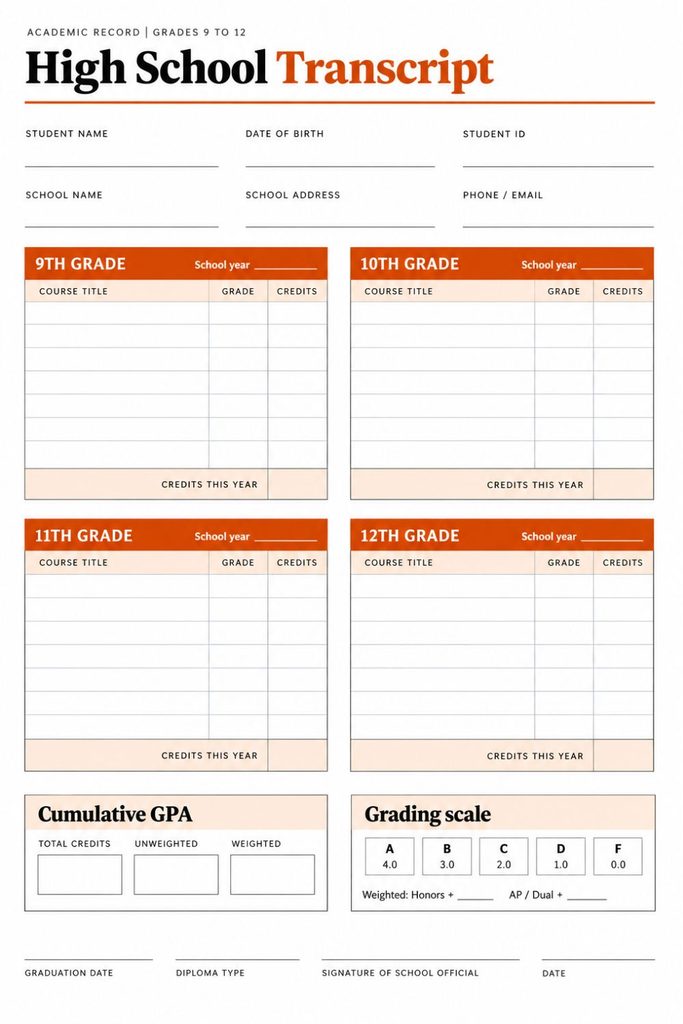
Courses are grouped by grade level (9th to 12th), with columns for course title, grade, and credits. A cumulative GPA box sits at the bottom. Best for traditional high schools and private schools.
Template 2: Semester-Based Transcript
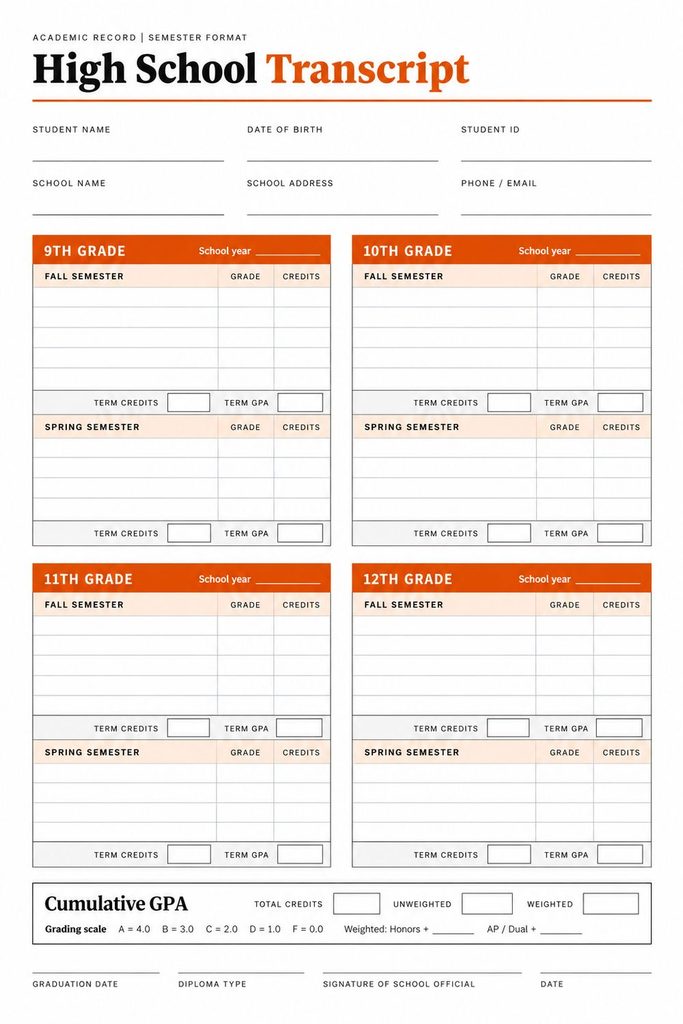
Each year is split into Fall and Spring, with separate credit and GPA totals per term. Best for schools that report grades by semester or for students who need to show mid-year progress.
Template 3: Homeschool Transcript
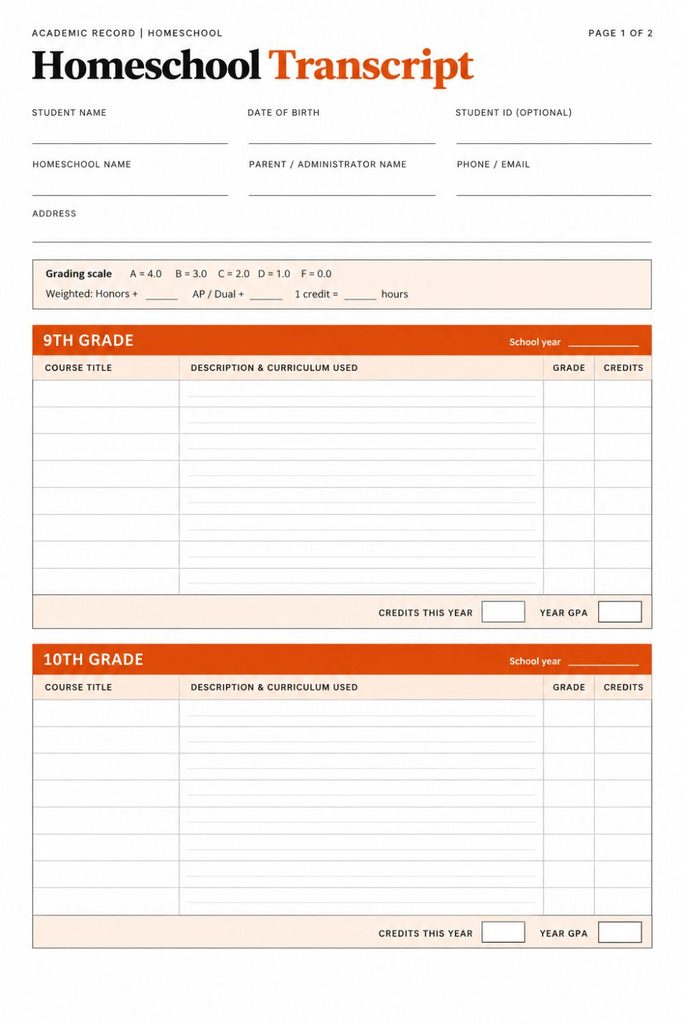
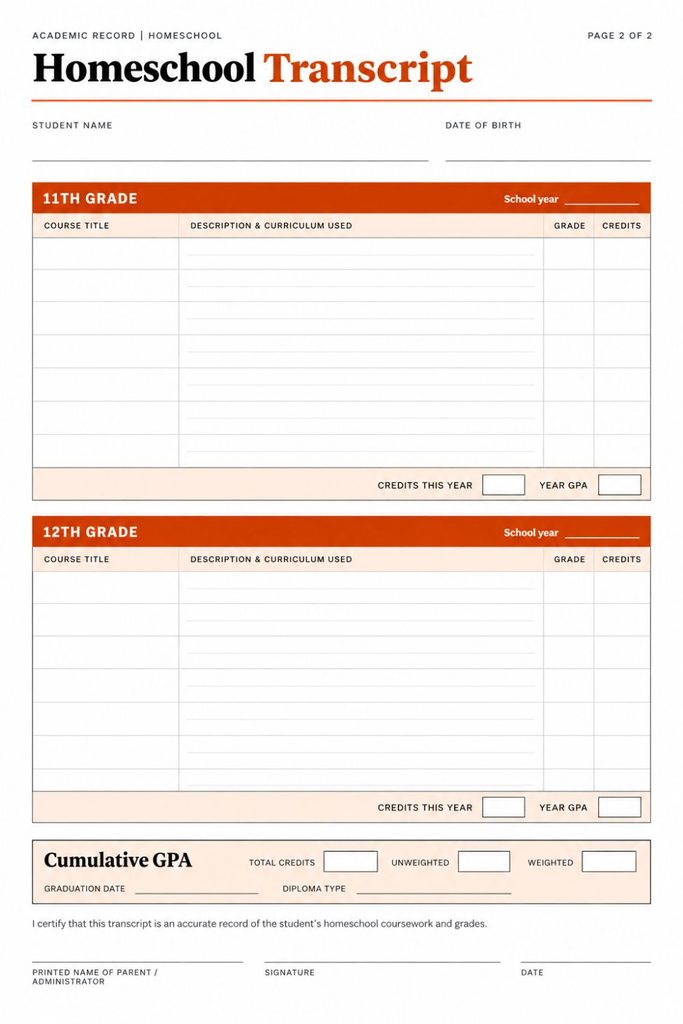
Adds fields for parent or administrator name, course descriptions, and curriculum used. It also includes a signature and date line. Best for homeschool families who need a transcript that looks official.
A transcript covers the full four years. If you only need to record grades for a single term, our high school report card template is the better fit.
Download Your Free Blank Transcript Template PDF
Everything you need is in one file. This printable PDF includes all three layouts covered above, so you can choose the one that fits your school setup and print only the pages you need. There’s no sign-up, no email required, and no watermark. Download it once and keep it for future use, whether you’re building a transcript for yourself, your child, or a student you’re helping.
What’s inside the PDF:
- Page 1: Basic 4-year transcript (grades 9 to 12)
- Page 2: Semester-based transcript (Fall and Spring per year)
- Pages 3-4: Homeschool transcript with course descriptions and signature line
- Every page includes: Student and school info, grading scale key, credits, weighted and unweighted GPA, graduation date
Before you print:
- Choose Actual size or 100% scale, not “Fit to page”
- Print only the pages for your template (for example, page 1 only)
- Black and white is fine; use a dark pen and clear block letters
- Print one extra copy to use as a draft before the final version
How to Fill Out the Template
Filling in a transcript takes about 15 minutes if you have your course list and grades ready. Follow these steps in order.
Step 1: Add student and school details
Enter the student’s full legal name, date of birth, school name, address, and contact info. For homeschool, add the parent or administrator name.
Step 2: List courses by year
Write each course under its grade level (9th to 12th) using clear titles, such as “Algebra I” or “English 9.” Add the term (Fall, Spring, or Full Year) if your template has that column.
Step 3: Assign credits
- Standard rule: 1.0 credit for a full-year course, 0.5 for a semester course
- Count only completed courses
- Keep the same rule across all four years
Step 4: Enter grades
Record the final letter grade for each course. Use the grading scale key on the template so the conversion is clear to the reader.
Step 5: Calculate GPA
- Convert each grade to points (A = 4, B = 3, C = 2, D = 1, F = 0)
- Multiply points by credits for each course
- Add up all results
- Divide by total credits attempted
For weighted GPA, many schools add 0.5 point for honors courses and 1.0 point for AP or dual enrollment courses before multiplying. Check your school’s or the college’s policy, since the exact scale varies.
Step 6: Add graduation date and sign
Enter the graduation date and diploma type, then sign and date the bottom line.
Short filled-in example (9th grade, partial)
| Course | Grade | Credits | Points x Credits |
|---|---|---|---|
| English 9 | A | 1.0 | 4.0 |
| Algebra I | B | 1.0 | 3.0 |
| Biology | A | 1.0 | 4.0 |
| Spanish I | B | 0.5 | 1.5 |
| Total | 3.5 | 12.5 |
GPA: 12.5 ÷ 3.5 = 3.57
Tip: Double-check your credit total before calculating. Most GPA mistakes come from a missed or miscounted course.
Wrapping up
A transcript doesn’t need to be fancy. It needs to be complete, accurate, and signed. With a ready-made template, you can skip the formatting and go straight to the part that matters: listing courses, credits, and grades.
A few things worth remembering:
- Keep your records current. Update the transcript at the end of each semester or school year instead of rebuilding it from memory in senior year. Save course lists, syllabi, and final grades as you go.
- Stay consistent. Use the same credit rule, grading scale, and course naming across all four years. Inconsistency can trigger follow-up questions from admissions offices.
- Label your GPA. If you show both weighted and unweighted GPA, mark each one clearly so the reader never has to guess.
- Keep supporting documents ready. Homeschoolers especially should keep course descriptions, reading lists, and test scores on file. Some colleges ask for them alongside the transcript.
- Make copies. Keep one signed original and one digital scan. Many applications are submitted online, and a clean PDF scan saves time.
- Check each school’s requirements. Some colleges and scholarship programs want a specific format, an official seal, or a counselor’s signature. A quick look at their guidelines can prevent delays.
A well-prepared transcript shows that the student’s work was taken seriously. Start early, stay organized, and keep everything accurate, and the transcript will do its job when it matters.
Looking for more ready-to-use tools? Browse our collection of free high school printables.

An Engineer, Maths expert, Online Tutor, and animal rights activist. I have more than 5 years of teaching experience and have worked closely with students with learning disorders. I have worked with special educators, counselors, and experts in dealing with common issues that students face during their academic journey.